Video Player - PRO Version
- 4.6
- Rating
- 100.00K
- Installs
- $6.99
- Price
 Analysis by App-foxy
I approached Video Player - PRO Version as a practical test of whether a paid video player can make everyday viewing feel simpler, faster, and less restricted than the player already installed on a phone. It belongs to the Video Players & Editors category and comes from Recorder & Music Apps. The app costs $6.99, carries an Everyone age rating, and supports devices running Android 6.0 or newer.
That price immediately changes how I judge it. A free player can be forgiven for basic controls or occasional friction, but a paid application has to earn its place through comfort, consistency, and a smoother viewing routine. After spending time with it, my impression is that its appeal is less about flashy presentation and more about having a dedicated player for people who regularly watch local video files.
How Video Player - PRO Version feels in everyday use
The first thing I look for in a video player is not a long feature list. I want to know whether I can open a file without getting lost, start playback without waiting around, and return to a video later without turning the whole process into a chore. That is where this app makes its clearest case. Its purpose is immediately understandable: it is a focused video player rather than an editor, social feed, or streaming service.
You May Also Like

 Blood Strike: 2.5 Anniversary
Blood Strike’s Loadouts Turn Every Drop Into a Tactical Gamble
A close look at Blood Strike’s custom loadouts: how fast access to signature weapons reshapes its battle royale rhythm, rewards preparation, and narrows the gap between fights.

 Pandora - Music & Podcasts
Pandora’s Music Is Easy to Start, but Harder to Recover
Pandora’s strength is its low-effort path from a seed to a station. Its weak spot is how much confidence it asks you to place in connection, setup, and quiet recovery.

 8 Ball Pool
 Is Built on Rivalries, Rematches, and Routine
A close look at the rivalries, rematches, shared routines, and unanswered safety questions that turn a quick pool match into a persistent mobile community.

 Samsung Music
’s Quiet Strength Is Playing What You Already Own
Its reach comes less from spectacle than from dependable access to a personal library. That simplicity is both the app’s strongest retention engine and its ceiling.

 AccuWeather: Weather Radar
AccuWeather Review: A Quick, Clear Forecast for Everyday Decisions
For everyday plans, the best forecast is the one you can understand quickly. AccuWeather makes rain timing, radar, and local conditions easy to act on, with a few trade-offs.

 Hill Climb Racing
Why Hill Climb Racing Still Turns Crashes Into One More Run
A tiny car, a bumpy hill and one more upgrade: Hill Climb Racing keeps resurfacing because its simple chaos makes every near-miss feel personal.
More From Our News Desk



The store summary presents it as a player with unlimited features and a thirty-day money-back guarantee. I would still treat that promise as a reason to check the purchase terms before paying, but it does communicate the intended position of the app: this is aimed at people who want a more complete viewing tool than a basic free option.
In normal use, perceived speed matters more than a benchmark number. Opening a small clip should feel immediate on a reasonably modern phone, while larger files naturally depend on the device, storage speed, and video format. I would not judge the app solely by how quickly its interface appears, because playback itself can be demanding when a file uses a format the phone cannot decode efficiently.
That distinction is important. A player may feel quick when browsing and still struggle with a demanding file, while another may open slowly but handle playback smoothly. My practical advice is to test the kinds of videos you actually watch rather than assuming that a high-end phone or a paid label guarantees perfect performance with every file.
What makes the paid version worth considering
The strongest argument for Video Player - PRO Version is convenience over time. If you only watch an occasional clip sent by a friend, the default player is probably enough. If you keep films, lessons, personal recordings, or downloaded videos on your device, a dedicated player can become a more comfortable part of your routine.
I especially see value for someone who moves between different folders and file types. Instead of treating each video as an isolated item opened from a file manager, a dedicated player gives the viewing task its own place. That sounds modest, but small reductions in friction matter when you repeat the same action several times a week.
There is also a useful psychological difference between a free utility and a paid one. Without advertising being part of the way I evaluate this particular app, I still expect a paid player to feel focused rather than cluttered. The purchase makes sense only if the interface and playback experience remain comfortable enough that I stop looking for alternatives.
One practical tip is to use the app as your first test for a representative group of files: a short phone recording, a longer high-quality video, and one file that has caused trouble elsewhere. This quickly reveals whether it suits your library. Testing only one easy clip can give an overly generous impression.
Heavy-use moments reveal more than the first launch
A video player is easy to praise after opening one short file. The more revealing situations are long viewing sessions, repeated opening and closing, switching between files, and watching while the phone is already busy with other tasks. Those moments expose whether navigation stays clear and whether the device begins to feel strained.
For a realistic everyday scenario, imagine commuting with several offline videos saved on your phone. You open one before leaving, pause it when you arrive, then return to another file later in the day. In that situation, the app’s usefulness depends on quick access, predictable controls, and playback that does not make you fight the interface. The best player is not necessarily the one with the most buttons; it is the one that lets you resume the habit without thinking about the software.
Long playback can also affect battery and heat, although those effects are influenced heavily by the phone and the video itself. High-resolution files, software decoding, bright screens, and wireless activity can all increase resource use. I would therefore avoid treating the application as the only cause if a device warms up during demanding playback.
My more cautious advice is to watch how the app behaves after the phone has been used for a while. Try opening a large file after several other applications have been active, then pause and resume it. This is a better test of practical stability than a fresh launch immediately after restarting the device.
Another non-obvious trade-off is storage organization. A dedicated player becomes more useful as your library becomes more orderly, but it cannot compensate for a chaotic collection of duplicate files and unclear names. Renaming videos and keeping them in sensible folders can improve the experience as much as changing players. The app is a viewing tool, not a substitute for managing the library itself.
Reliability, recovery, and the moments that matter
Reliability is not simply the absence of a crash. For me, it also means that a failed or interrupted playback attempt does not turn into a confusing recovery process. A useful player should make it easy to try again, choose another file, or return to normal navigation after something goes wrong.
Video files are not all equal. A file can be incomplete, unusually encoded, damaged, or simply beyond what a particular device handles comfortably. When that happens, I would not automatically blame the player. The fair test is whether the app remains understandable: can I back out, retry, and continue with another video without the whole interface becoming unresponsive?
This is one reason I prefer a gradual evaluation. I would begin with files that already play correctly elsewhere, then introduce more demanding material. If the app performs well with ordinary content but struggles with one unusual file, that points to a compatibility issue rather than a general reliability failure. If basic files repeatedly fail, the problem is more serious.
Recovery also includes interruptions from calls, notifications, screen locking, and switching to another application. These are normal parts of mobile viewing, not edge cases. I pay attention to whether returning to playback feels natural or whether I have to rebuild the session from the beginning.
Because the current version is 7.2.3, the app is not presented as an early experimental release. That gives me more confidence in expecting a settled experience, but version numbers alone do not prove that every device and file combination will behave identically. Android phones vary widely, especially across older hardware and manufacturer-specific software.
The app has reached over one hundred thousand installs, with a 4.6 average from around six thousand ratings and three hundred reviews. Those figures suggest that many users have found it worthwhile, but they should be read as a broad signal rather than a guarantee for a particular phone. A rating cannot tell you whether your own video collection uses easy formats or demanding ones.
Older devices and Android compatibility
Support for Android 6.0 or newer gives the app a wide compatibility range, which is useful for people who keep an older phone as a media device. At the same time, operating-system compatibility is not the same as equal performance. A phone that can install the application may still have less memory, a slower processor, or weaker hardware decoding than a newer model.
This is where expectations need to stay realistic. On an older device, the app may be perfectly suitable for ordinary clips while struggling with large or high-quality files. If your priority is maximum battery life or the lightest possible workload, the simplest player already included with the phone may be the better choice.
I would also consider screen size and storage. A large collection is more comfortable to browse on a device with a clear display, while limited free space can make the overall video routine frustrating regardless of the player. The application can play what is available, but it cannot create storage or improve a phone’s decoding hardware.
For users with a newer phone, the main question is different: does the paid experience offer enough comfort to justify the purchase? New hardware may already make the default player feel fast and stable. In that case, the PRO version needs to provide a noticeably better workflow, not merely acceptable playback.
One useful habit is to keep a small “test” folder containing the files you use most often. After installing or updating the player, checking those same files gives you a consistent way to judge whether the experience remains dependable. It is more useful than relying on vague impressions from a single viewing session.
How it compares with the usual alternatives
The obvious alternative is the default video player that comes with the phone. That option wins on convenience because it is already installed and usually integrated with the device’s file browsing. For light users, there may be no reason to pay for another application. If you watch only occasional recordings, the built-in tool is likely the sensible starting point.
Free third-party players create a tougher comparison. They may offer broad format support or familiar controls without an upfront cost. Their advantage is flexibility for experimentation; their disadvantage can be a less focused experience, depending on the individual app. Video Player - PRO Version is easier to justify when you value a dedicated, paid utility and plan to use it regularly.
Streaming applications are not direct replacements. They are better for discovering online content, managing subscriptions, and watching services that do not exist as local files. This app is more relevant when the videos are already on your phone. Choosing it for streaming would be misunderstanding its role.
Editing applications are another poor substitute. If you need trimming, captions, transitions, or exports, a player will not replace an editor. The category itself places this app among video players and editors, but its identity is clearly centered on watching rather than producing content. I would keep those jobs separate instead of expecting one application to handle everything.
There is also a privacy and control angle to local playback, although I would not turn that into a promise about the app’s policies. Watching files stored on the device can be more predictable than depending on a connection, which is helpful during travel or in places with unreliable service. The trade-off is that you are responsible for obtaining, organizing, and storing the files yourself.
Who should install it, and who should skip it
I would recommend Video Player - PRO Version to someone who watches local videos often and wants a dedicated paid player rather than constantly relying on whichever tool opens a file by default. It is also a reasonable option for a person maintaining an older Android phone, provided their expectations match the hardware and their files are not unusually demanding.
The app is less convincing for casual viewers. If your phone’s existing player already opens every video you watch and you rarely need anything beyond play, pause, and seeking, the $6.99 purchase may not produce a meaningful improvement. Paying for a player only makes sense when the repeated convenience outweighs the cost.
I would also suggest skipping it if your main goal is video editing, online streaming, or automatic media management. Those needs belong to different kinds of applications. Installing this one will not solve a workflow problem it was not designed to address.
Families may appreciate the Everyone rating, but an age rating does not describe every practical viewing situation. Parents should still manage the files available on a shared device and decide whether the phone itself is appropriate for a child. The rating simply indicates that the application is positioned for a general audience.
My performance verdict after weighing speed and stability
My overall view is that Video Player - PRO Version is best understood as a focused paid utility, not a miracle upgrade for every phone. Its perceived speed should be good for ordinary use when the device and files are well matched, while heavy playback will naturally expose the limits of older hardware and demanding formats.
The app’s strongest quality is the promise of a more deliberate viewing workflow: open a local video, watch it without unnecessary detours, and return to your collection when you are ready. Its weakest point is the price barrier. A free default player can be perfectly adequate, and that makes the paid version a choice for regular users rather than an automatic recommendation for everyone.
Recorder & Music Apps has positioned this as an app with unlimited features, and the thirty-day money-back guarantee lowers some of the risk for people who are willing to evaluate it properly. I would use that opportunity carefully: test several real files, try a longer session, check how it recovers from interruptions, and see whether it remains comfortable on your particular device.
After that test, the decision should be straightforward. If you repeatedly watch local videos and the dedicated workflow feels smoother than your current alternative, the paid version can earn its place through everyday convenience. If your needs are occasional, streaming-focused, or editing-focused, keeping the default player or choosing a different type of app is the more sensible route.
For my recommendation, I would place it in the “worth trying for frequent local playback” category. The 4.6 average and broad install base make it look established enough to consider, while the Android 6.0 requirement keeps it accessible to many devices. Just remember that the final performance verdict belongs to the combination of this app, your phone, and the files you actually watch.
FAQs for Video Player - PRO Version
01What is Video Player - PRO Version, and what can it play?
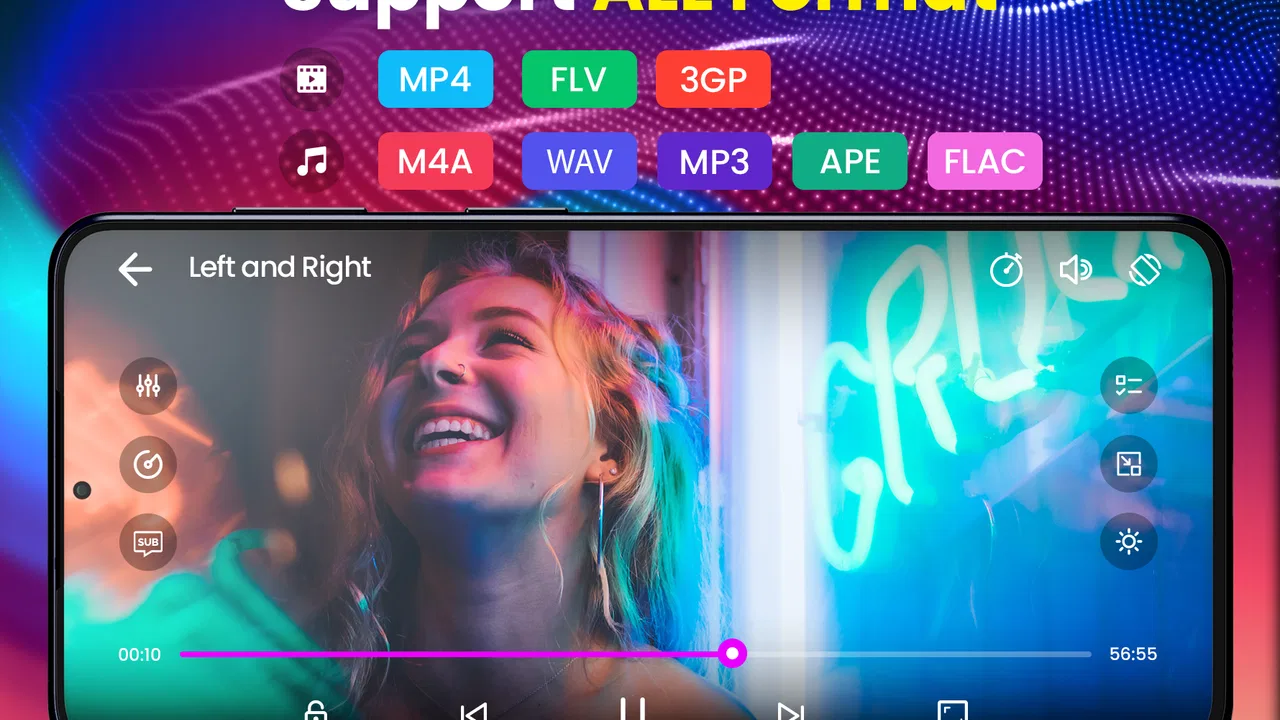
Video Player - PRO Version is designed for users who want a convenient way to watch locally stored videos on a mobile device. Depending on the version and device, it may support common formats such as MP4, AVI, MKV, MOV, and similar files. It typically includes essential playback controls, full-screen viewing, volume and brightness gestures, and options for selecting videos from local storage. Actual format compatibility can vary by operating system and installed codecs.
02Does Video Player - PRO Version support subtitles and multiple audio tracks?
Subtitle and audio support is an important consideration before downloading the app. Video Player - PRO Version may support external subtitle files and videos containing more than one audio track, although the exact formats and available controls can differ between Android and iOS releases. Users should check whether their preferred subtitle type, language selection, synchronization controls, and encoding are supported before relying on the application for multilingual movies or television shows.
03Is Video Player - PRO Version free to use, or does it require payment?
The PRO Version may be offered as a paid download, a one-time in-app purchase, or a premium upgrade depending on the store and current developer pricing. Payment arrangements can also change over time. Before installing, review the official Google Play or App Store listing carefully for the price, subscription details, trial conditions, and refund policy. A PRO label does not always mean that every feature is included without additional purchases.
04Does Video Player - PRO Version require internet access?
A video player generally allows you to watch files already saved on your device without a continuous internet connection. Video Player - PRO Version should therefore be useful for offline playback, such as during travel or in areas with limited connectivity. Internet access may still be needed for downloading videos from cloud services, displaying advertisements in certain editions, checking licenses, receiving updates, or accessing network locations. Availability of these functions depends on the app version and permissions.
05Is Video Player - PRO Version safe, and what permissions does it request?
Before downloading, users should review the permissions requested by Video Player - PRO Version through the official store listing and their device settings. A local media player normally needs access to photos, videos, files, or media storage so it can locate and play content. Be cautious if the app requests unrelated permissions, such as contacts or precise location. Downloading from Google Play or the App Store, keeping the app updated, and checking the developer information are sensible safety precautions.
Pros
- Supports a wide range of popular video and audio formats.
- Offers smooth playback with useful gesture-based controls.
- Includes subtitle support for a better viewing experience.
- Can play videos stored locally without requiring an internet connection.
- Provides a clean interface with practical playback options.
Cons
- Some advanced features may require additional setup or configuration.
- The interface can feel dated compared with newer media players.
- Performance may vary on older or lower-powered devices.
- Subtitle compatibility may differ depending on the file format.
- It may consume noticeable battery during extended high-resolution playback.

Video Player - PRO Version
Gallery